
Tuya isn’t a new name to me. I’ve seen it pop up in all sorts of products over the years, and in my mind it always meant one thing:
You can control devices using your phone instead of a remote control.
In fact, my office furniture company (Allcam) even sells a TV lift that features Tuya smart control. It’s genuinely useful — especially for customers with short memories, or those who have already lost their fifth remote control of the month.
But beyond that, I had no idea what Tuya really was.
So when I realised the Tuya app couldn’t handle proper automation — and that I’d need the Tuya Developer Platform instead — my first reaction was simple:
Why on earth does switching on a light need a developer platform?
Still, I registered a developer account anyway.
I Logged In… and Immediately Regretted It
As mentioned in Chapter 14, my goal was straightforward:
- If Camera A detects motion → switch on Light B
- If Customer C makes a booking → create a passcode in Lock D
The kind of logic any human can easily understand in one sentence.
So I logged into Tuya’s Developer Platform expecting to find something like a “Rules” page, or a big friendly button called Create Automation.
Instead, I landed on a dashboard that looked like a cockpit for launching satellites. There were menus everywhere: Cloud Services, API Explorer, Message Statistics, Usage, Logs…
I clicked. I searched. I wandered around like a lost tourist. Hours passed.
And I still couldn’t find the one thing I wanted: a place to create an automation rule.
The screenshot below gives you a taste of what I was looking at — and why I started questioning my life choices.
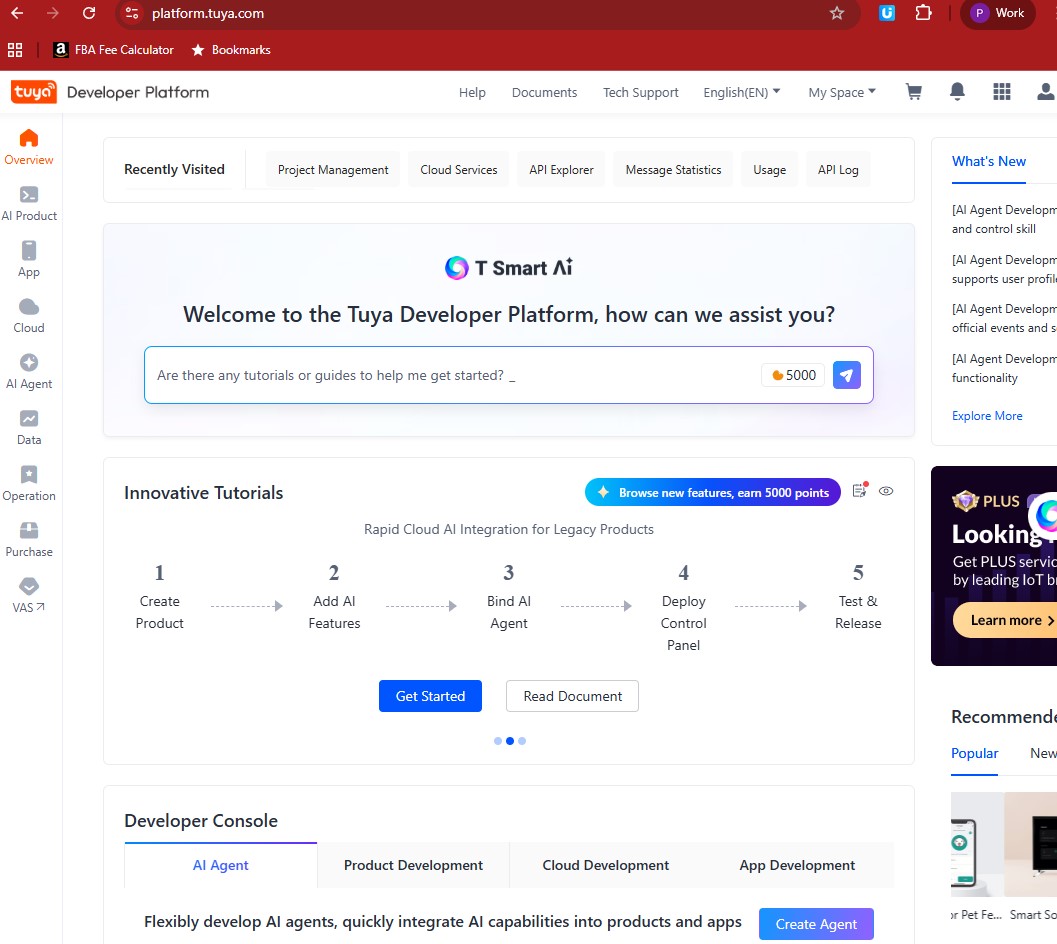
Tuya Developter Platform Dashboard
Where Are the Tutorials?
At this point I thought, Fine. I’ll learn it properly.
So I searched for tutorials — something simple like:
“How to control a Tuya smart lock with API.”
“How to trigger lights from camera motion.”
“How to create access codes automatically.”
But the tutorials I found were either too basic or completely unrelated. In short: nothing that helped me build what I needed.
So I reached a familiar conclusion: I needed help.
Hiring a Freelancer
I’ve hired freelancers before, and the platform I like most is Fiverr.com. It’s simple: people list exactly what they can do, they show examples, and they clearly price different levels of service.
After some searching, I found a couple of freelancers offering Tuya-related work. I picked one developer who claimed to be a full-stack engineer with Tuya experience.
His demo was modest — a web interface that could switch a strip light on and off. Not exactly a self storage access system, but at least it proved he could talk to Tuya devices.
We agreed:
- £200 for an initial demo
- £2,000 for the first phase trial in real conditions
He also advised me to set up an AWS account and point a subdomain of birminghamselfstorage.uk to it.
At the time, I didn’t really understand why. I kept thinking:
Why does a “simple control logic” need a cloud server and a subdomain?
Surely I’m just switching lights and locks?
But later, I realised something important:
The Tuya Developer Platform is not where your automation runs.
It’s only where you manage various Tuya APIs and cloud projects.
Your actual automation logic still has to live somewhere else — and in our case, that “somewhere else” was AWS.
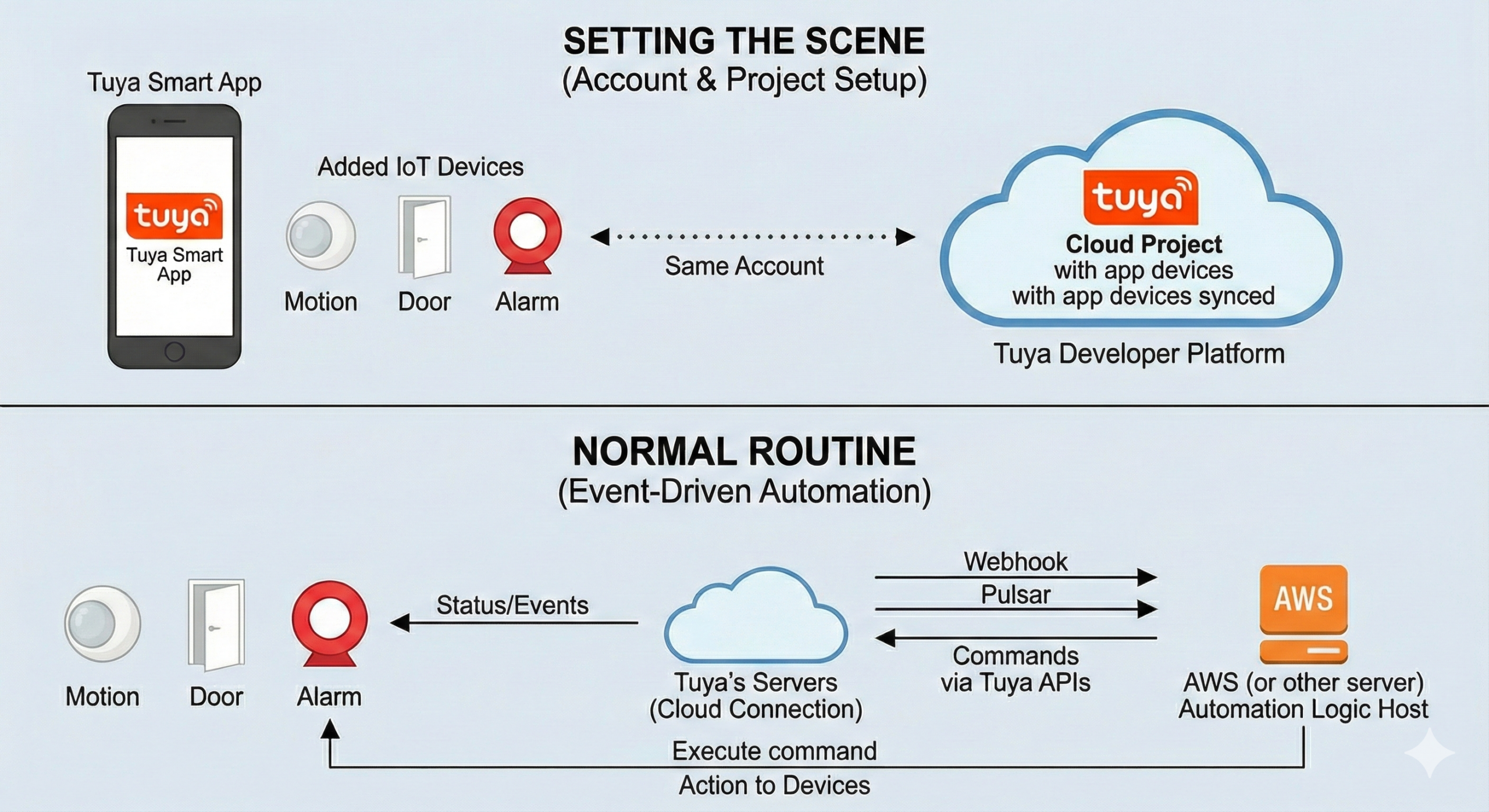
How Tuya Cloud Projects Work?
After months of stumbling, learning, and quietly regretting my optimism, I finally understood how a Tuya Cloud Project actually works.
Here’s the flow:
- Add IoT devices to the Tuya app
- Create a Cloud Project on the Tuya Developer Platform using the same account (so your app devices appear inside the cloud project)
- Host your automation logic on AWS (or another server)
- Devices send status/events to Tuya’s servers (e.g., motion detected, door opened)
- Your AWS control logic listens to those events (via webhook / pulsar) and sends commands back via Tuya APIs
So two simple tasks — lighting automation and access control — became five separate tasks, across three systems, multiple APIs, and a cloud server.
Meanwhile… the Building Still Needed Work
While the freelancer worked on cracking those five steps, my own workload didn’t slow down. Because while I was busy fighting Tuya APIs in my head…
I was also converting an old office-cum-warehouse into a self storage site, and that meant physical problems too. Real ones. Heavy ones. Expensive ones.
So while my software project quietly became a mini engineering programme, the building was also demanding attention — every single day.
Next Chapter: How to convert an old building into a self storage warehouse? Part 1. The Architectural Plan
free to follow my BSS journey — where technology and bricks compete to see which one breaks me
Leave a Reply