
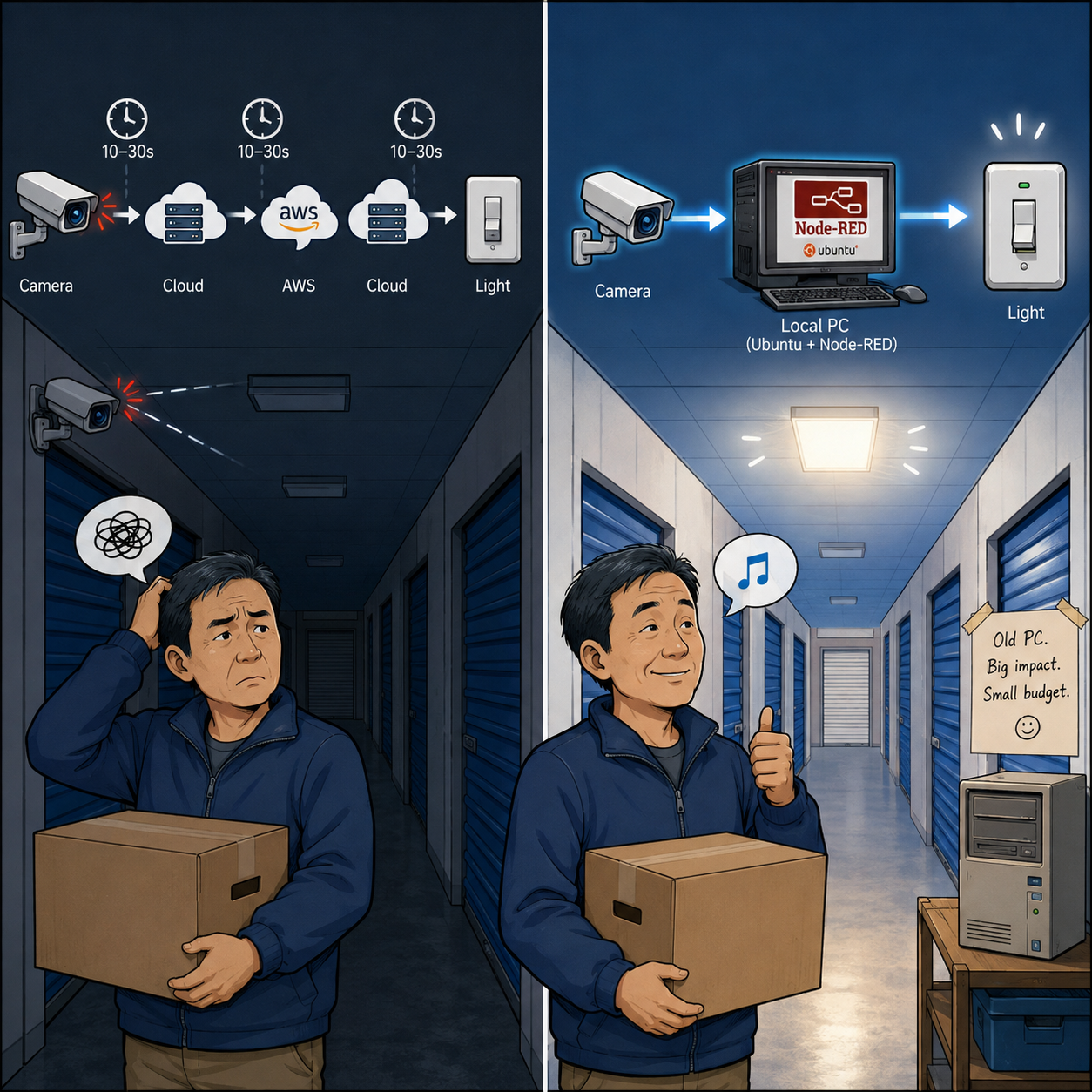
In the last chapter, I mentioned a serious problem with the Tuya + AWS cloud control system:
time delay.
The smart cameras could detect movement.
The smart switches could turn lights on.
The cloud logic could connect them.
But sometimes there was a delay.
Sometimes 10 seconds.
Sometimes 30 seconds.
Occasionally even longer.
At home, this was annoying.
In a self storage facility, it was dangerous.
A customer walking into a dark corridor while carrying boxes does not care how clever my cloud architecture is. They only care that the lights come on immediately.
And they would be right.
It was also a major disappointment. Starting with very little programming experience, I had already struggled through Tuya, AWS, encryption, Pulsar messaging, APIs, webhooks, and TTLock. After all that effort, it suddenly looked as if the whole cloud-control approach might be fundamentally wrong.
You might think the answer is obvious:
Just get a better internet connection.
Just use a faster cloud server.
And yes, in many situations, that would be the standard answer.
But small business owners always have cost sitting quietly in the corner, clearing its throat.
A dedicated corporate internet connection could easily cost around £500 per month. A fast package available to the general public costs around £50 per month. That difference is roughly £5,000 per year.
For a large company, maybe that is just another line in the IT budget.
For a small startup business like Birmingham self storage, it matters.
So if a dedicated corporate internet line was out of the question, what else could I do?
Five years earlier, I probably would have been stuck.
But this time, thanks to AI and a lot of searching, I found another answer:
Node-RED local control.
Instead of sending every small movement event on a long journey through the cloud, something inside the building should handle the immediate response.
The logic became beautifully simple:
Movement detected → Node-RED → light on
No international cloud tour.
No waiting for distant servers.
No customer standing in the dark while my “smart” system thinks about it.
Node-RED is a visual programming tool. Instead of writing everything as code, you connect blocks — called nodes — together like a working flow chart.
For someone like me, this was very appealing. I did not need to become a full-time software engineer just to switch on a corridor light.
Of course, Node-RED still needs somewhere to run.
In simple terms, we needed a computer inside the building to act like our own small local “AWS”.
At first, like most people, I looked for a simple Windows version. I searched the Node-RED website and the internet, expecting to find a neat installer.
There wasn’t one in the way I imagined.
At first I thought, How can this be possible?
Then I realised the problem was not Node-RED. The problem was my expectation.
Node-RED normally runs on top of Node.js, and we also need a tool called Docker to deploy it. Luckily, I had already encountered both while wrestling with the AWS cloud system, so these words no longer frightened me quite as much as they once would have.
The situation became clear:
I needed to run my own min “AWS” inside the building.
And instead of Windows, the system most commonly used for this kind of server work is Ubuntu.
That raised a new set of questions.
What exactly is Ubuntu?
How difficult is it for someone with no practical experience to use?
And how much would the hardware cost?
That became the next challenge.
Next Chapter: The Local Ubuntu Server
free to follow my BSS journey — a real, unfiltered account of building an independent self-storage business in the UK, one problem, mistake, and hard-won solution at a time.
Leave a Reply